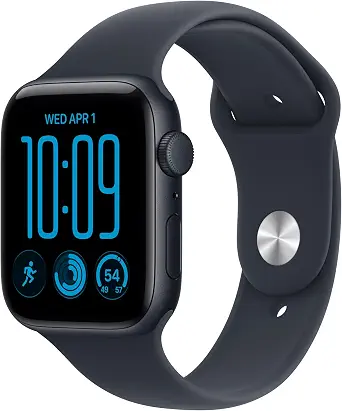
Apple Watch SE 3 GPS 44mm Smartwatch
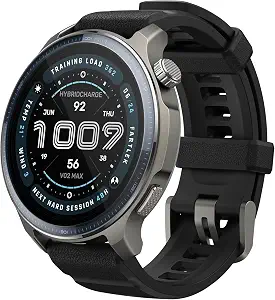
Amazfit Balance 2 Smart Watch
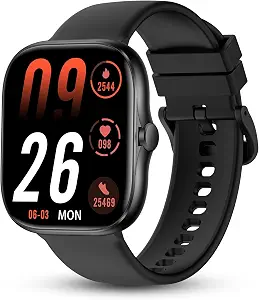
Smart Watch for Men Women, Bluetooth Calling Fitness Tracker, iOS/Android
Best Smart Watch Buying Guide — Black Friday Deals 2026
A useful smart watch shortlist starts with the phone you plan to use, then narrows by the information and everyday tasks you want on your wrist. These options range from Apple-focused connectivity and safety features to broad sports tracking and direct wrist calls. Their battery descriptions also cover different situations, so compare them in their own terms rather than treating every claim as equivalent. During Black Friday, a seasonal headline is not enough to establish that a particular model or configuration suits you. Check the exact listing, its stated compatibility and the offer details before deciding. The recommendations below are editorial choices among these products, not the result of product testing.
Apple Watch SE 3 GPS 44mm Smartwatch
The Apple Watch SE 3 GPS 44mm is the Best Overall choice here for shoppers who want a connected everyday watch with workout tracking, health-related features and safety functions in the same product. That label is an editorial pick from this shortlist, not a claim of measured superiority. Before a Black Friday purchase, start with its stated connection requirements: this GPS model works with your iPhone or Wi-Fi. If you are choosing a watch for another phone, do not assume this listing establishes compatibility; check the actual offer and your intended setup.
For day-to-day activity, SE 3 can track workouts ranging from running and strength training to working toward 10K steps a day. Its health features include temperature sensing that enables insights in the Vitals app and Cycle Tracking app, plus sleep score tracking and sleep apnea notifications. Those details can help you decide whether the watch’s particular mix of activity and health information is relevant to your routine. They are not a reason to assume that every feature is useful to every shopper; consider which information you expect to revisit.
Safety may be a meaningful part of the decision for someone who wants those functions available on a watch. SE 3 can detect a hard fall or severe car crash, automatically help connect you with emergency services, and notify emergency contacts. Keep the wording in view: the described functions are tied to detecting a hard fall or severe car crash and helping connect with emergency services. During Black Friday, compare the exact product listing rather than relying on a broad smartwatch category label to establish which model you are considering.
The stated battery life is all-day, 18-hour use from sunup to sundown. Charging is described separately: it can charge up to twice as fast as SE 2 and provide up to 8 hours of battery in just 15 minutes. These are distinct claims, so consider both your expected wear pattern and whether the charging detail matters to you instead of comparing a charging interval directly with another watch’s typical-use battery claim. The watch can also send texts, take calls, play music and podcasts, use Siri, and show notifications. It is a considered pick when those communication and safety details fit your priorities, rather than simply because Black Friday places it in a deal roundup.
Key specs
| Health tracking | Temperature sensing* enables insights in the Vitals app* and Cycle Tracking app.* You can also track your sleep score, get sleep apnea notifications,* and more. |
| Workout tracking | SE 3 can track your workouts in a variety of ways—from running and strength training to achieving your 10K steps a day. |
| Safety features | SE 3 can detect a hard fall or severe car crash, automatically help connect you with emergency services, and notify your emergency contacts.* |
| Battery life | Enjoy a smartwatch with all-day, 18-hour battery life from sunup to sundown.* |
| Charging | Then charge up to twice as fast as SE 2 and get up to 8 hours of battery in just 15 minutes.* |
| Connectivity | SE 3 (GPS) works with your iPhone or Wi-Fi to keep you connected. |
| Communications | Use your smartwatch to send a text, take a call, listen to music and podcasts, use Siri, and get notifications. |
Amazfit Balance 2 Smart Watch
The Amazfit Balance 2 earns the Best for Long Battery Life label because its stated battery claim is up to 21 days under typical use. This is an editorial distinction among the listed choices, not a guarantee that every person will get that duration. If less frequent charging is high on your shortlist, read the phrase “under typical use” as part of the claim and decide whether it matches the way you expect to use a watch. As you review Black Friday offers, keep the exact model and its stated battery conditions in view.
Its 1.5" AMOLED display is paired with sapphire crystal glass. That combination gives shoppers specific display and screen-material details to weigh when reviewing the listing, without needing to assume anything beyond the supplied description. The watch is listed with water resistance to a depth of 100 meters, a useful specification to consider alongside how you plan to wear it. Treat the stated depth as the product detail provided, and check the exact offer rather than generalizing from the word “water” in a listing title.
For activity planning, the Balance 2 supports training across 180+ sports. Its GPS description specifies dual-band support from six satellite systems. Those details may appeal if you want a watch whose listed functions address a range of sports and GPS support; they do not establish how a particular activity will feel in practice. Look at the types of activities you actually want to track, then decide whether this broader stated menu matters more to you than other features on the shortlist.
Compatibility is listed as Android 7.0 and above or iOS 15.0 and above. Confirm your phone’s operating system against that requirement before getting drawn in by a Black Friday headline. A match on compatibility and the battery wording can make this option a strong candidate for someone prioritizing fewer charging interruptions, while the offer itself still needs careful review. Verify that the listing identifies the Balance 2 and check the specific variant and offer terms. Do not let the Best for Long Battery Life label stand in for that check: it describes why this watch has a place in this guide, not a measured promise for your own use.
Key specs
| Display | 1.5" AMOLED |
| Screen material | sapphire crystal glass |
| Battery life | up to 21 days of battery life under typical use |
| Water resistance | Water Resistance Depth 100 meters |
| Sports tracking | Train across 180+ sports |
| GPS | dual-band support from six satellite systems |
| Phone compatibility | Android 7.0 and above, iOS 15.0 and above |
Smart Watch for Men Women, Bluetooth Calling Fitness Tracker, iOS/Android
Check Price on Amazon
The Smart Watch for Men Women, Bluetooth Calling Fitness Tracker, iOS/Android is the Best Budget pick in this guide. That is an editorial category label, not a statement about its price relative to products elsewhere; the supplied details do not establish a price. During Black Friday, compare the actual offer instead of assuming that a “budget” label means a particular discount. The practical case for this option is its stated combination of wrist calling, activity and health tracking, and compatibility with specified Android and iOS versions.
The display is listed as 1.83 inches with a resolution of 240 X 284 Pixels, and Bluetooth is specified as Bluetooth 5.3. It supports making, answering and rejecting calls directly on your wrist. If wrist calls are a priority, check that capability against the way you expect to use the watch and confirm the listing is for this exact product. The title’s mention of Bluetooth calling is supported by the call functions provided, but avoid assuming other communication features that are not stated.
The listed tracking includes heart rate, blood oxygen, a step counter and a sleep monitor. Sports modes include walking, running, cycling and hiking. This set of details offers a clear basis for deciding whether the watch covers the information and activities you want to follow. It may suit someone who values those named functions over choosing a watch for a specific additional feature listed elsewhere in this guide. Think about which readings or activity modes you would return to, rather than treating a longer checklist as automatically more useful.
Battery wording here is 5-7 days of active use and up to 30 days in standby mode. Those are separate usage descriptions, so do not compare the standby figure as though it described active use. Compatibility is stated as Android 9.0 and above and iOS 12.0 and above; confirm your phone’s system version before purchase. Black Friday offer review should cover both that compatibility and the exact model details, not just the deal headline. For a shopper whose priorities line up with wrist calls and the listed tracking functions, this is a distinct value-oriented shortlist option, while the final decision should still depend on the actual offer and fit.
Key specs
| Display | 1.83 inches |
| Resolution | 240 X 284 Pixels |
| Bluetooth | Bluetooth 5.3 |
| Calling | supports making, answering and rejecting calls directly on your wrist |
| Health tracking | track heart rate, blood oxygen, step counter sleep monitor. |
| Sports modes | including walking, running, cycling and hiking |
| Battery | 5-7 days of active use and up to 30 days in standby mode. |
| Compatibility | Android 9.0 and above, as well as iOS 12.0 and above. |
Set the phone boundary before weighing features
Start by checking whether a watch’s stated compatibility works with the phone you intend to use. The Apple Watch SE 3 GPS listing says it works with your iPhone or Wi-Fi, while the Amazfit Balance 2 specifies Android 7.0 and above or iOS 15.0 and above. The Smart Watch for Men Women lists Android 9.0 and above and iOS 12.0 and above. These are different descriptions, so do not treat one watch’s requirements as applying to the others. Check the operating system on your own phone and compare it with the exact product details.
This first filter is useful during Black Friday because a prominent offer can pull attention toward features before you know whether the stated setup is suitable. Read the full listing for the precise model and variant, and confirm that the compatibility wording applies to the item you are considering. If you are buying for someone else, verify the intended phone rather than guessing from the recipient’s device brand. Once the basic fit is clear, compare the functions that matter to that person’s routine. Compatibility is not the entire decision, but settling it early keeps a tempting seasonal listing from doing the shortlisting for you.
Choose the information you want to revisit
Think about what you want to see regularly, rather than counting features. The Apple Watch SE 3 combines workout tracking for activities such as running and strength training with temperature sensing that enables insights in the Vitals app and Cycle Tracking app. It also lists sleep score tracking and sleep apnea notifications. The other options describe different tracking menus: the Amazfit Balance 2 lists training across 180+ sports, while the Smart Watch for Men Women names heart rate, blood oxygen, steps, sleep monitoring and modes including walking, running, cycling and hiking. Each set gives you a different basis for choosing.
Make a short personal priority list: perhaps named activities, particular health information, or a specific style of sleep tracking. Then verify that the relevant feature appears in the exact listing you plan to buy. Feature names alone should not be treated as a promise of a particular result or as a substitute for deciding whether the information is useful to you. During Black Friday, it is easy for a listing’s broad category language to obscure the details that distinguish models. Use the stated features to narrow your options, and let your own intended routine decide which ones merit attention.
Read charging claims as separate scenarios
Battery descriptions can refer to different kinds of use, so keep their qualifications attached. The Apple Watch SE 3 is described as offering all-day, 18-hour battery life from sunup to sundown, alongside a separate charging claim: up to 8 hours of battery in just 15 minutes, with charging up to twice as fast as SE 2. The Amazfit Balance 2 states up to 21 days under typical use. The Smart Watch for Men Women lists 5-7 days of active use and up to 30 days in standby mode. Active use, typical use, standby and charging time are not interchangeable descriptions.
Use those statements to ask practical questions about your own charging habits: do you prefer a stated typical-use duration, do you care about a short charging interval, or do you need to distinguish active use from standby? The supplied details do not define identical conditions for all three products, so avoid turning them into a direct performance ranking. When a Black Friday listing repeats a battery claim, check that it corresponds to the exact model and retain the original qualification as you compare. A clear understanding of what each claim describes is more useful than picking the largest-looking figure.
Weigh wrist communication against other priorities
If you want a watch to handle more than tracking, compare the communications described for each product. The Apple Watch SE 3 can send a text, take a call, listen to music and podcasts, use Siri and get notifications. The Smart Watch for Men Women supports making, answering and rejecting calls directly on your wrist. Those are the specific functions supplied for these models; do not assume that one product offers another’s listed capabilities unless the actual listing says so. Decide which tasks you want to handle without reaching for your phone, and use that answer to focus your shortlist.
Safety and water details call for their own careful reading. SE 3 can detect a hard fall or severe car crash, help connect with emergency services and notify emergency contacts. The Balance 2 lists water resistance to a depth of 100 meters. These are different types of specifications, not interchangeable reasons to choose a watch. Consider whether either detail is central to your use, and read its wording rather than extending it into an unstated guarantee. For Black Friday shopping, a distinct feature can be a useful tie-breaker only after the phone fit, intended use and model identity are clear.
Turn the seasonal listing into a final verification
Treat Black Friday as a time to inspect an offer, not as proof that the product is right or that a promotion is active. Before checkout, confirm that the listing identifies the model you shortlisted and that the displayed configuration matches the features you used to make your decision. Recheck compatibility, battery wording and the specific functions that matter to you. If the listing’s title is broad, do not let that replace checking the product details. This process helps distinguish a relevant offer from one that merely shares a general smartwatch description.
Then compare the offer as presented on the page, using only details actually shown there. This guide supplies no price or discount information, so it cannot establish whether a particular Black Friday offer represents a saving. Check the current listing for the exact item and its offer terms, and make sure your decision still makes sense without relying on a seasonal headline. If a detail you need is unclear, treat that uncertainty as a reason to verify before buying rather than filling in the gap with assumptions. A careful model check is the final stage after fit and feature priorities, not a substitute for either.
Use a shortlist that reflects your day
A sound decision can be made in stages: first confirm the phone requirement, next select the tracking or communication features that suit your routine, and finally verify the exact model and offer. The Apple Watch SE 3 brings together stated workout, health, communication and safety details; the Amazfit Balance 2 has a long typical-use battery claim, broad sports tracking, GPS details and stated water resistance; and the Smart Watch for Men Women lists direct wrist calls and several named tracking functions. The distinctions matter more than a universal winner.
Before completing a Black Friday purchase, revisit the feature that made your preferred option stand out and confirm it on the listing. Keep battery claims in their original context, check compatibility against the phone in use and avoid assuming a deal headline proves a discount or a match. The Best Overall, Best Budget and Best for Long Battery Life labels are editorial guides to this selection, not test results or market-wide awards. Choose the watch whose stated details best answer your own priorities, then let the exact offer—not the season alone—settle the decision.
Make your Black Friday choice
The best smart watch for your shortlist is the one whose stated requirements and features make sense for your phone and daily routine. Begin with compatibility, narrow by the tracking, calls or safety details you value, and read battery language in context. Then verify the exact model and offer before acting on a Black Friday listing. The labels here can help organize the choices, but they cannot determine personal fit or confirm a promotion. A careful final check keeps the decision grounded in the details that actually matter to you.