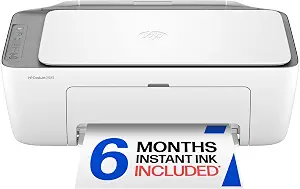
HP DeskJet 2923 Color Inkjet Printer
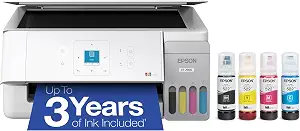
Epson EcoTank ET-2900 Wireless All-in-One Color Supertank Printer
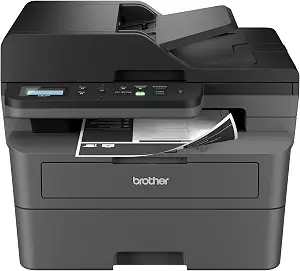
Brother DCP-L2640DW Wireless Compact Monochrome Multi-Function Printer
Best Printer Buying Guide — Black Friday Deals 2026
A useful printer shortlist starts with the pages you expect to produce, not a Black Friday banner. These three models serve different routines: the HP DeskJet 2923 handles color printing alongside copying and scanning; the Epson EcoTank ET-2900 pairs color all-in-one functions with refillable tanks and a stated included-ink yield; and the Brother DCP-L2640DW is a monochrome model with fast listed print speed and an automatic document feeder. First decide whether you need color, what document handling would save effort, and how you want to manage supplies. Then check the exact model and configuration shown in any Black Friday offer. The right choice is the one whose listed functions, connections and supply format fit the work you actually do.
HP DeskJet 2923 Color Inkjet Printer
The HP DeskJet 2923 is the Best Budget choice among these three for shoppers whose routine calls for color, copying and scanning without moving to a model centered on document throughput. It combines color print, copy and scan functions with a 60-sheet input tray, plus mobile and wireless printing. That combination can suit a household handling occasional forms, school materials, labels or color pages, while keeping several everyday tasks in one device. The label is an editorial fit within this shortlist, not a claim about a current price or a market-wide award. Check the Black Friday listing for the exact model and included configuration rather than assuming the label means a particular deal.
Its stated speeds are up to 7.5 ppm black and 5.5 ppm color. Those figures give a useful point of reference if you print in batches, but they should be weighed against your actual jobs: someone producing a few pages at a time may care more about color and copying than about pace, while someone facing repeated large document batches may want to compare the Brother’s stated speed and feeder. The HP’s maximum color print resolution is up to 4800 x 1200 optimized dpi, with the qualification that this applies when printing from a computer on selected HP photo papers and with 1200 input dpi. Keep that condition in mind when judging whether the resolution is relevant to your intended output.
Connectivity includes Apple AirPrint, USB, Wi-Fi, wireless direct printing and Mopria, giving shoppers several listed ways to approach printing from devices or a computer. Duplexing is manual, with driver support provided; if you regularly need two-sided pages, consider whether a manual process suits your routine. The stated dimensions are 11.97"D x 16.73"W x 6.06"H, which can help you check a proposed location before ordering. During Black Friday shopping, compare the listing’s exact model name, supplies and configuration, then decide whether the HP’s color and copy/scan mix outweigh its manual duplex approach for your own work.
Key specs
| Functions | Color print, copy, scan, and a 60-sheet input tray, plus mobile and wireless printing |
| Print speed | Up to 7.5 ppm black, 5.5 ppm color |
| Connectivity | Apple AirPrint; USB; Wireless (Wi-Fi); Wireless direct printing; Mopria |
| Duplex | Manual (driver support provided) |
| Maximum color print resolution | Up to 4800 x 1200 optimized dpi color (when printing from a computer on selected HP photo papers and 1200 input dpi) |
| Dimensions | 11.97"D x 16.73"W x 6.06"H |
Epson EcoTank ET-2900 Wireless All-in-One Color Supertank Printer
Check Price on Amazon
The Epson EcoTank ET-2900 is the Best Overall pick within this group for shoppers who want color all-in-one capability and a tank-based ink setup. Its EcoTank supply includes enough ink to last up to 3 years, and the stated included yield is up to 3,600 pages black and 6,500 color. Those are the product’s stated supply figures, not a promise that every household will reach the same duration: actual needs depend on what and how much you print. Supersized tanks and uniquely keyed EcoFit bottles are described as making refilling simple. If you prefer to consider the included supply as part of the purchase, this is the model to examine closely in a Black Friday comparison.
The printer’s listed speed is 11 black/6 color ISO ppm. It also has a 100-sheet paper tray, a high-resolution flatbed scanner and a 1.44" color display. The tray may be useful for a routine that involves keeping paper loaded between jobs, while the flatbed scanner suits scanning individual items placed on its surface. Wi-Fi is the listed connectivity. Consider whether those features match the way your household works: a user who mainly prints color pages may value the stated color yield, while someone regularly handling multi-page document stacks may want to compare the Brother’s 50-page auto document feeder instead.
This is the strongest all-around shortlist fit when the combination of color, scanning, Wi-Fi and supplied tank ink aligns with your priorities; the label is a guided choice among these products, not a test result. Before a Black Friday purchase, look at the exact ET-2900 listing and confirm that the configuration and included ink details correspond to what you intend to buy. Then consider your expected print mix and whether the stated black and color yields are useful for that mix. The tank system is a different supply approach from a printer for which the provided facts list compatible toner, so choose based on the replenishment format you would rather plan around—not on an assumed future cost.
Key specs
| Ink supply | Epson EcoTank includes enough ink to last up to 3 years |
| Included ink yield | WORRY-FREE PRINTING — Epson EcoTank comes with enough ink to print up to 3,600 pages black/6,500 color |
| Ink refill system | Supersized ink tanks and uniquely keyed EcoFit bottles make refilling ink simple |
| Print speed | 11 black/6 color ISO ppm |
| Paper tray | 100-sheet paper tray |
| Scanner | high-resolution flatbed scanner |
| Display | 1.44" color display |
| Connectivity | Wi-Fi |
Brother DCP-L2640DW Wireless Compact Monochrome Multi-Function Printer
Check Price on Amazon
The Brother DCP-L2640DW is Best for Fast Document Workflows in this shortlist. Its listed print speed is up to 36 ppm, and it includes a 50-page auto document feeder. Together, those facts make it a relevant option for shoppers whose regular work involves batches of monochrome documents and pages that need to be fed for processing. It is a wireless compact monochrome multifunction printer, so it is not the color-focused choice here. The label describes the kind of workflow it may suit among these three models; it does not establish measured superiority. When looking at a Black Friday offer, first confirm the exact DCP-L2640DW model and then decide whether monochrome output and the listed document handling fit your jobs.
The Brother supports auto-duplex printing, which may suit routines that call for two-sided pages without the manual handling specified for the HP. Its maximum media size is 8.5 x 14 inch. For connectivity, the provided details list built-in dual-band wireless at 2.4GHz / 5GHz and Ethernet, giving shoppers a choice between wireless and wired network connections. Think about where the printer will be used and which connection you prefer before selecting it. The supplied information lists compatible TN830 and TN830XL toner; factor that supply format into your comparison without assuming a particular replacement price or lifespan.
A fast listed print rate is only one part of a document workflow. Consider whether you will use the auto document feeder, whether automatic two-sided printing matters, and whether the monochrome format suits the pages you produce. If your routine includes color work, compare the Epson and HP instead; if it centers on scanning and copying alongside faster monochrome printing, the Brother’s multifunction identity may make it worth investigating, while checking the listing for the functions and configuration shown. For Black Friday, compare the exact model and included configuration rather than relying on a broad headline. That keeps the choice grounded in the stated speed, feeder, duplex and connection details that matter to your work.
Key specs
| Print speed | print speeds up to 36 ppm(2) |
| Document feeder | A 50-page auto document feeder(4) |
| Wireless | built-in dual-band wireless (2.4GHz / 5GHz) |
| Wired connections | Ethernet |
| Duplex | Auto-Duplex |
| Maximum media size | 8.5 x 14 inch |
| Compatible toner | TN830, TN830XL |
Sort your print mix into practical priorities
Start by separating color jobs from monochrome documents. If you routinely need color pages and also want copying and scanning, the HP lists all three functions, and the Epson is a color all-in-one model with a flatbed scanner. If your recurring work is monochrome documents, the Brother is the explicitly monochrome option in this group. That distinction can eliminate a poor fit before you compare secondary details. A family printing an occasional colored worksheet may not have the same priorities as someone handling repeated stacks of black text pages; neither routine alone determines the best choice.
Next, consider what happens to documents before and after printing. Do you scan items on a flat surface, copy a page now and then, or feed a batch of documents? The Epson lists a high-resolution flatbed scanner, while the Brother lists a 50-page auto document feeder. The HP lists copy and scan functions. Match those stated details to the tasks you expect to repeat, rather than treating every multifunction label as interchangeable. During Black Friday browsing, narrow the options by those essential tasks first; then use speed, paper capacity, connectivity and supply format to decide among the models still in contention.
Choose a supply approach you can plan around
The Epson stands apart here by listing supersized ink tanks and uniquely keyed EcoFit bottles, along with included ink stated to yield up to 3,600 pages black and 6,500 color. It also states that the ink can last up to 3 years. Treat both as product claims to consider against your own print habits, not as a prediction for every buyer. A household with uneven or occasional use should think about whether the stated yield is relevant to its expected mix; someone with steady printing may put more weight on the supplied ink figures.
The Brother’s supplied facts identify TN830 and TN830XL as compatible toner, while the HP facts in this guide describe its printing and connectivity rather than a supply yield. Don’t infer an ongoing cost or included quantity from those details. Instead, check the exact listing for supply information and compare the replenishment format you prefer. Black Friday can make the initial offer especially prominent, but a considered purchase also accounts for how you expect to replenish supplies later. Where listings provide comparable details, compare them directly; where a detail is not stated, avoid treating it as a settled advantage or disadvantage.
Picture the pace and handling of a normal job
Speed figures are most meaningful when you imagine the work arriving at the printer. The Brother lists up to 36 ppm and a 50-page auto document feeder, which may be relevant to someone who often handles document batches. The Epson lists 11 black/6 color ISO ppm, and the HP lists up to 7.5 ppm black and 5.5 ppm color. These figures use the wording provided for each model, so compare them as listed rather than assuming that every measurement is presented on an identical basis. A small, occasional job may make other features more important than a headline speed.
Paper handling can also change the feel of a routine. The HP has a 60-sheet input tray, while the Epson has a 100-sheet paper tray. The Brother lists auto-duplex printing; the HP specifies manual duplex with driver support. Ask whether two-sided pages are common enough to shape your choice, and whether the stated tray information suits the way you work. These details are not a complete prediction of day-to-day performance, but they help distinguish a simple print job from a routine involving batches, repeated loading or two-sided output. Make that distinction before treating a Black Friday speed claim as the deciding factor.
Make the connection and placement fit your room
Connection needs are personal: one shopper may want wireless printing from devices, while another may prefer a wired network link. The HP lists Wi-Fi, wireless direct printing, USB, Apple AirPrint and Mopria. The Epson lists Wi-Fi. The Brother lists dual-band wireless at 2.4GHz / 5GHz as well as Ethernet. These are the connections stated for these products; they are a starting point for checking compatibility with your intended setup, not a reason to assume support for an unlisted device or service. If more than one person will print, consider how the listed options correspond to the devices and network you plan to use.
Placement deserves a practical check too. The HP’s dimensions are 11.97"D x 16.73"W x 6.06"H. For the other models, use the exact listing to confirm dimensions and configuration before deciding where either will go. Think about access to the paper tray and, for the Epson, the display; for document work, consider how you would position the Brother for the feeder. These are planning questions, not claims about a required setup. Before a Black Friday order, verify that the offered model fits the space and connection arrangement you intend to use.
Read a Black Friday offer as a specific item
A deal headline is not enough to identify what you will receive. Check that the product name and model match the one you shortlisted: HP DeskJet 2923, Epson EcoTank ET-2900 or Brother DCP-L2640DW. Then inspect the listing for the configuration and included items actually presented. The product facts here do not establish a current promotion, a sale price, a discount or stock status, so treat those as details to verify on the offer itself. Do not assume that a Black Friday label changes the printer’s stated functions or the supplies shown in a particular listing.
Compare the offer against your own decision criteria in order. First, confirm essential fit: color or monochrome, the functions you need and the connection that suits your setup. Second, look at useful extras such as the Epson’s stated ink yield, the Brother’s feeder and auto-duplex, or the HP’s listed mobile printing methods. Finally, verify the exact configuration and supply information in the listing. If an important detail is unclear, avoid filling the gap with an assumption. This staged check helps you judge whether the specific offer matches your shortlist without treating a promotional presentation as proof that it is the right purchase.
Use the shortlist to make a confident final choice
Before deciding, summarize your routine in plain terms: what you print most, whether color matters, whether you copy or scan, how often documents arrive in batches, and which connection you expect to use. If those answers point toward color and a tank-based ink supply, investigate the Epson. If they point toward color with copy and scan functions and a 60-sheet tray, consider the HP. If they point toward monochrome document work, a listed 50-page feeder and auto-duplex, consider the Brother. These are different fits, not a universal ordering of quality.
Then check details that can be overlooked when comparing Black Friday listings: the exact model, the configuration shown, the stated supply information and the features most important to you. Give special attention to qualified claims, such as the HP’s conditional maximum color resolution and the Epson’s stated yield and duration. Make the final call only after the offer corresponds to the product you intended to compare. This process keeps the purchase tied to real needs and listed facts, rather than a generic promotion or an unverified assumption.
Make your Black Friday choice
For this shortlist, the Epson EcoTank ET-2900 is the Best Overall choice when color, a flatbed scanner and the stated tank-ink supply appeal to your routine. The HP DeskJet 2923 earns Best Budget as a color print/copy/scan option with several listed connection methods, while the Brother DCP-L2640DW is Best for Fast Document Workflows when monochrome output, its listed print speed and auto document feeder align with your work. These labels are editorial guidance among the featured products. As Black Friday approaches, verify the exact model and configuration, then choose by the tasks and supply approach you expect to live with. A suitable printer is the one that fits your regular work—not simply the one with the most prominent offer.