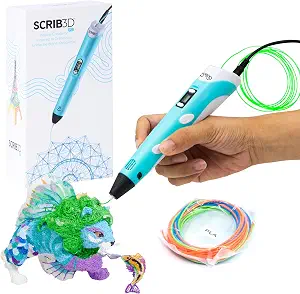
SCRIB3D P1 3D Printing Pen with Display
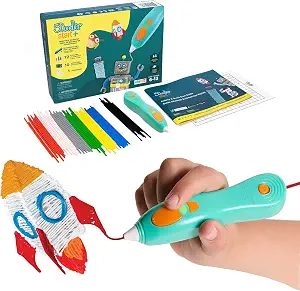
3Doodler Start+ Essentials 3D Pen Set for Kids
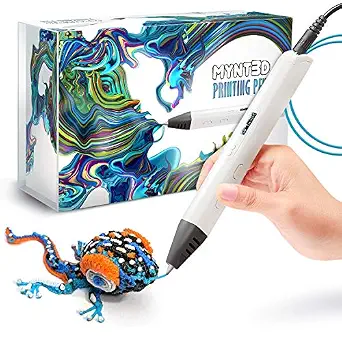
MYNT3D Professional Printing 3D Pen with OLED Display
Best 3D Pen Buying Guide — Black Friday Deals 2026
A useful 3D pen shortlist starts with the person using it and the controls or materials they want to manage. The SCRIB3D P1 includes PLA filament and supports stated PLA and ABS temperature ranges; MYNT3D adds an OLED temperature display and adjustable feed; 3Doodler Start+ is designed for ages six and up with no hot parts. Those differences matter more than a seasonal label. During Black Friday, compare the exact model and included kit shown in the offer rather than assuming every listing has the same bundle. Decide first whether age guidance, temperature adjustment, or included supplies are your priority. Then check whether the specific offer matches that choice.
SCRIB3D P1 3D Printing Pen with Display
The SCRIB3D P1 earns the Best Budget label among these selections for shoppers whose shortlist centers on the listed starter supplies and straightforward speed control. Its box includes three colors, totaling 30 feet of PLA plastic, plus a power adapter, step-by-step manual, and free stencil guide. That set of stated contents gives a buyer several specific items to check against the exact Black Friday offer. Confirm the P1 model and the listed bundle rather than treating the seasonal event as evidence that every version comes with identical materials or accessories.
Speed is controlled through a stepless function designed for optimal speed control. The pen is specified for PLA at 160-210℃ (320-410°F) or ABS at 210-235℃ (410-455°F), so the material information can help narrow a choice when those are relevant to a project. It takes about 2-3 mins. to warm up, and a 2 minute auto sleep function starts after 3D doodling stops. Those timing details are useful for planning a session that may include preparation or pauses; they are not a promise about how quickly a particular project will be completed. Consider whether the supplied PLA, stated material options, speed function, and pause behavior fit your preferences. If temperature monitoring on an OLED display is a must-have, compare the MYNT3D listing instead. The P1 is a focused choice when the listed kit and its specific controls suit the work you have in mind.
Key specs
| Filament | Includes 3 colors (30 feet) of PLA plastic |
| Speed control | stepless speed function designed for optimal speed control |
| Filament compatibility | PLA (160-210℃, 320-410°F) or ABS (210-235℃, 410-455°F) |
| Auto sleep | 2 minute auto sleep function after 3D doodling stops |
| Warm-up time | this will take about 2-3 mins. |
| Included accessories | a power adapter, step-by-step manual, and a free stencil guide |
3Doodler Start+ Essentials 3D Pen Set for Kids
For a family choosing a first pen with a stated age range, the 3Doodler Start+ Essentials is the Best Overall choice in this guide. It is listed for ages six and up, and its design is described as having no hot parts. Those are practical details to put at the front of the decision, especially when an adult is choosing a creative activity for a child. They do not replace checking the product information and deciding what supervision and setting are appropriate for the intended user. The distinction from the other options is clear: this set foregrounds its age guidance and pen design rather than an OLED temperature display or specified temperature adjustment.
The kit includes mixed-color Start+ Plastics in 72 strands, a DoodlePad/Doodlemat, and an Activity Guide. That combination gives a shopper concrete contents to compare when considering a Black Friday offer: verify that the listing is for this Essentials set and that the included plastics and activity accessories match the expected package. The pen is also listed with dimensions of 9.06 x 6.02 x 2.56 inches, a detail worth considering when planning where to keep the set. No filament compatibility or temperature range is specified in the provided product details, so do not assume it uses the materials named for another pen. Choose this option when its age guidance, no-hot-parts design, and included activity items fit the intended use; look elsewhere if adjustable feed or temperature monitoring is the priority.
Key specs
| Age | Ages 6+ |
| Pen design | Designed with no hot parts |
| Included plastics | Mixed-Color Start+ Plastics(72 Strands) |
| Included accessories | DoodlePad/Doodlemat |
| Included guide | Activity Guide |
| Dimensions | 9.06 x 6.02 x 2.56 inches |
MYNT3D Professional Printing 3D Pen with OLED Display
Check Price on Amazon
Choose the MYNT3D Professional Printing 3D Pen when seeing and adjusting temperature are central to your shortlist. It is the Best for temperature-aware adjustments selection here because its large OLED display lets you monitor the material temperature, while temperature is adjustable in 1 degree increments from 140 to 230 C. That is a product-specific reason for the label, not a claim of measured superiority. For a shopper who wants temperature information visible at the pen and fine increments available for adjustment, these features deserve close attention before comparing optional accessories or seasonal offers.
The MYNT3D also has adjustable feed to regulate speed and flow. Its included kit lists three colors of PLA plastic filament and an A/C adapter. As Black Friday listings can present different offers or variants, check that the exact listing identifies the Professional Printing model and shows the contents you expect; do not presume an offer includes anything beyond the stated kit. The product dimensions are 7.99 x 5.2 x 2.6 inches, which can help with a practical storage decision. The details supplied do not state a warm-up time, auto-sleep function, age recommendation, or material range, so use the listing’s own information for any requirement on those points rather than transferring specifications from another pen. This option is a good shortlist fit when adjustable feed and temperature visibility matter more to you than a guide or mat listed with another set.
Key specs
| Feed control | Adjustable feed lets you regulate speed & flow |
| Temperature adjustment | Temperature is adjustable in 1 degree increments from 140 to 230 C |
| Display | Large, OLED display lets you monitor temperature of material |
| Included filament and adapter | Kit includes 3 colors of PLA plastic filament, A/C adapter |
| Dimensions | 7.99 x 5.2 x 2.6 inches |
Set the shortlist by user and setting
First consider who will use the pen and which provided facts address that situation. The 3Doodler Start+ is listed for ages six and up and is designed with no hot parts, making those details important starting points for someone shopping for a child. The other two products have different stated strengths: SCRIB3D lists material options, stepless speed control, and an auto-sleep function, while MYNT3D lists temperature adjustment, an OLED display, and adjustable feed. These are distinctions to compare, not a universal ranking of suitability.
Think through the likely session before browsing Black Friday offers. Would the user benefit most from the Start+ Activity Guide and DoodlePad/Doodlemat, from the P1’s included PLA and stencil guide, or from seeing temperature on the MYNT3D display? If the user’s needs are not clear, start with the features you know are required and set aside preferences that are merely appealing. Use age guidance as a selection factor where it applies, and read the complete product listing for any other suitability information you need. A clear user-first shortlist makes it easier to judge whether a Black Friday offer is for the right product, rather than being distracted by an attractive but irrelevant bundle.
Decide which controls belong in your workflow
The controls differ enough to guide the choice. SCRIB3D describes its speed function as stepless and designed for optimal speed control. MYNT3D specifies adjustable feed for regulating speed and flow, plus temperature adjustment in 1 degree increments from 140 to 230 C and a large OLED display for monitoring material temperature. The provided Start+ details emphasize the pen design and activity contents rather than describing comparable feed or temperature controls. Select based on which stated control you expect to use, not on the assumption that more adjustments automatically make a better fit.
For a person who wants temperature information visible while working, MYNT3D has a clearly stated display. For someone who prioritizes control over feed and flow, its adjustable feed is also explicit. If stepless speed control is more relevant, the P1 provides that feature. Black Friday can make it tempting to compare offers before deciding what matters, but a lower or more prominently presented offer is not a substitute for the control you actually want. Write down your essential control preferences, then check the exact model and listing details. If you do not expect to use a particular adjustment, it may be less important than included materials, a guide, or the age-related design that makes another option a better match.
Treat material details as a project filter
Material information is a practical checkpoint, not a detail to fill in by guesswork. SCRIB3D states compatibility with PLA at 160-210℃ (320-410°F) or ABS at 210-235℃ (410-455°F), and its kit includes three colors, totaling 30 feet, of PLA plastic. MYNT3D’s listed kit includes three colors of PLA filament, but the provided details do not specify a supported material range. The Start+ package includes mixed-color Start+ Plastics in 72 strands; the supplied information does not describe those plastics as PLA or ABS.
If you have a particular material in mind, compare its requirements with the exact product information before choosing. Do not transfer one pen’s stated compatibility to another, and do not infer details that are not listed. A Black Friday offer should be checked for both the pen model and the materials actually included; package names and images alone may not answer every compatibility question. If you expect to use supplied material first, make sure the offer lists the relevant bundle contents. If you intend to use other material, seek confirmation from the product listing rather than assuming it will work. This simple check helps keep a purchase aligned with the intended project without treating a filament quantity or color count as a measure of overall value.
Compare the useful contents, not just the pen
The included items may shape the first session as much as the pen itself. Start+ lists an Activity Guide, DoodlePad/Doodlemat, and 72 strands of mixed-color Start+ Plastics. SCRIB3D lists a step-by-step manual, free stencil guide, power adapter, and three colors totaling 30 feet of PLA. MYNT3D lists an A/C adapter and three colors of PLA filament. These are the stated package details; they do not establish that accessories are interchangeable or that one package is better for every maker.
Make a short checklist of the contents you value and compare it with the exact Black Friday listing. A guide or mat may matter to a buyer who wants those specific included items, while another shopper may give greater weight to the MYNT3D temperature display or the P1’s stated material choices. Check the model name, the listed bundle, and any included-material description before deciding that an offer fits. Avoid judging value solely by the number of components or the appearance of a package image. The useful question is whether the contents correspond to your plans and whether the listing says they are part of that particular offer. If a desired item is not clearly stated, do not assume it is included.
Make the exact-offer check your final step
Once the intended user, controls, and materials are clear, verify the offer itself. Confirm the product name and model, then read the package description for the included items you expect. During Black Friday, the seasonal label alone does not confirm a promotion, a particular price, or a bundle’s contents. Compare the displayed offer with the exact configuration you chose, and base the decision on information shown for that listing. This avoids treating a mention of a deal as proof that every version or seller’s offer is the same.
Use the product-specific facts as a final checklist: Start+ age guidance, no-hot-parts design, plastics, mat, and guide; P1 speed function, stated material ranges, supplied PLA, warm-up time, and auto sleep; MYNT3D feed control, temperature adjustment, display, filament, and adapter. Not every point will matter to every shopper, so mark only the requirements relevant to your use. Black Friday browsing is more manageable when the decision is already narrowed to a model and package, rather than an open-ended search for the biggest-looking offer. If a listing leaves a key requirement unclear, seek clarification or choose based on the details that are confirmed.
Make your Black Friday choice
For a child-focused choice, begin with the 3Doodler Start+ age guidance, no-hot-parts design, and activity contents. For a pen with stated PLA and ABS ranges, stepless speed control, and included PLA, consider the SCRIB3D P1. For visible temperature information and adjustable feed, consider MYNT3D. The Best Overall and Best Budget labels are editorial picks among these three products, not claims of tested or market-wide superiority. Before buying during Black Friday, verify the exact model and bundle and decide whether the listed contents meet your needs. A well-matched configuration is a more useful goal than a seasonal label by itself.