Bambu Lab P2S Combo
Best Bambu 3D Printer Buying Guide — Black Friday Deals 2026
A Bambu 3D printer shortlist is easier to build when you separate essential fit from appealing extras. Start with the projects you expect to make, then consider whether an enclosure, automatic calibration, multi-color capability or filament drying would change your routine. The P1S Combo, P2S Combo and A1 offer different features, so a model name alone does not settle the choice. During Black Friday, compare the exact configuration and offer details rather than assuming a promotion includes a particular accessory. The recommendations below are editorial roles among these three options, not claims about market-wide standing or measured performance.
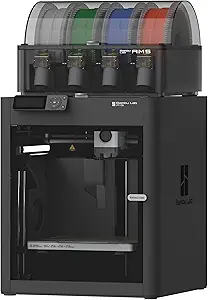
Bambu Lab P1S Combo
The Bambu Lab P1S Combo is the Best Overall pick in this shortlist for shoppers balancing an enclosure, stated material guidance and a path to multi-color printing. Its fully enclosed body is described as improving print performance for advanced filaments. The guidance lists PLA, PETG, TPU, PVA, PET, ABS and ASA as ideal, PA and PC as capable, and carbon- or glass-fiber-reinforced polymer as not recommended. Treat those categories as planning information, not a promise that every project or filament will behave the same way.
For colorful designs, the stated capability is up to 16 colors, with Bambu Lab AMS required. That qualification matters: before a Black Friday purchase, inspect the exact listing and package details to confirm what is included and what you would need to add. The word Combo by itself is not a substitute for checking the offer’s contents. If your projects are mainly single-color, this capability may not be a priority; if color or material changes are central, the required AMS connection belongs in your cost and setup comparison.
Automatic bed leveling is another practical convenience, particularly if you would rather have the printer handle that calibration step. The model measures 15.31 x 18.03 x 15.31 inches and weighs 47.5 pounds, so plan a stable location with room for the complete unit before checkout. Its Best Overall label reflects this particular mix of listed features, not a claim that it is the best choice for every buyer. On Black Friday, weigh the enclosure and material notes against your actual projects, then compare the exact configuration with the alternatives. Choose it when those capabilities matter enough to justify its footprint and any separately required components.
Key specs
| Multi-color printing | Up to 16 Colors: Bring your designs to life with vibrant multi-color/multi-material printing capabilities, perfect for showcasing your creativity. Note: Connecting Bambu Lab AMS is required. |
| Enclosure | Fully enclosed body improves print performance for advanced filaments. |
| Bed leveling | Auto bed leveling makes 3D printing such an easy thing. |
| Supported filament | Ideal: PLA, PETG, TPU, PVA, PET ABS, ASA; Capable : PA, PC; Not Recommended: Carbon/Glass Fiber Reinforced Polymer. |
| Dimensions | 15.31 x 18.03 x 15.31 inches |
| Weight | 47.5 pounds |
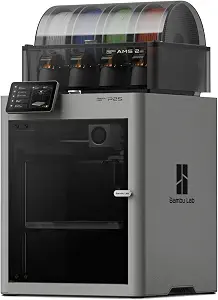
Bambu Lab P2S Combo
The Bambu Lab P2S Combo earns the Best for Built-In Filament Drying role because its listed AMS feature includes drying at up to 65 °C. That may be the most relevant detail for shoppers who want drying capability as part of their printer setup. Consider whether this function addresses a real need in your workflow; a headline feature is useful only when it fits the materials and routine you plan to use. The available facts do not describe drying duration or outcomes, so use the stated temperature as a feature to verify rather than a guarantee about a particular filament.
The P2S prints up to 600 mm/s and includes a PMSM Servo Extruder and Active Flowrate Compensation. These details can help you identify what the listing offers, but they should not replace your own project priorities. Ask whether speed-related specifications, extrusion features or drying are the reasons you are considering this model, then compare those against the other listed choices. The provided information does not establish a direct performance comparison with the P1S Combo or A1.
For color plans, the product information says the P2S printer does not support multi-color printing and that the Combo version is required. Since this product is named P2S Combo, read the Black Friday offer carefully to understand the exact configuration and included contents rather than inferring accessories from the name. Its listed dimensions are 18 x 22 x 18 inches, and its weight is 46.3 pounds; account for that footprint when choosing a spot. This is a focused pick for someone drawn to the stated built-in drying feature, not a universal recommendation. Before buying, make sure the offer matches your color plans and that the feature you value is actually part of the configuration shown.
Key specs
| Dimensions | 18 x 22 x 18 inches |
| Weight | 46.3 pounds |
| Print speed | prints up to 600 mm/s |
| Extrusion features | the PMSM Servo Extruder and Active Flowrate Compensation |
| AMS filament drying | built-in filament drying at up to 65 °C |
| Multi-color configuration | The P2S 3D printer does not support multi-color printing; Combo version required. |
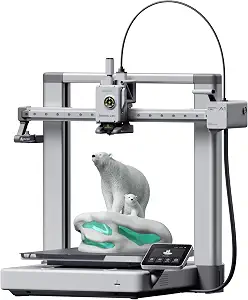
Bambu Lab A1 3D Printer
The Bambu Lab A1 is the Best Budget choice in this guide, an editorial shortlist role rather than a claim that it has the lowest Black Friday price. Decide whether the exact offer fits your budget, then judge the printer by the features you will use. Its calibration processes are handled automatically, and it has active flow rate compensation. Those features make calibration and flow compensation useful points to consider if you want those tasks addressed by the printer rather than treated as separate decision criteria.
The A1 reaches an acceleration of 10,000 mm/s² and uses a 1-Clip quick swap nozzle. These specifications may help you compare what matters for your work, but do not assume they establish a particular real-world result. For multi-color printing, AMS lite is required; the product information says to get the A1 Combo or buy AMS lite separately. If color is important, verify the exact offer and what it includes before deciding. If you are comparing a printer-only configuration, keep the required accessory in mind rather than treating multi-color capability as ready to use without it.
At 21.76 x 20.83 x 12.87 inches and 22 pounds, the A1’s listed dimensions and weight are useful when planning its location and handling. Think through where it will sit and whether the stated configuration suits your projects. The Best Budget label signals the role assigned within this three-product guide; it does not predict a price or discount. During Black Friday, compare the actual offer against your spending limit and the cost of any separately needed component. The A1 is a sensible shortlist candidate when automatic calibration and its listed features align with your needs, while the exact package and your color plans remain important checks.
Key specs
| Dimensions | 21.76 x 20.83 x 12.87 inches |
| Item weight | 22 pounds |
| Acceleration | acceleration of 10,000 mm/s² |
| Multi-color printing | AMS lite required, get A1 Combo or buy AMS lite seperately. |
| Calibration | The A1 3D printer takes care of all the calibration processes automatically |
| Flow rate compensation | active flow rate compensation |
| Nozzle | The 1-Clip quick swap nozzle |
Set the project brief before the Black Friday shortlist
Begin with a short description of what you want to print: the kinds of objects, the materials you expect to use, and whether multiple colors are essential or merely appealing. This keeps the comparison grounded in practical needs. If an enclosure is important to your plans, the P1S Combo is the one here whose facts specifically describe a fully enclosed body and give material guidance. If drying is the feature you are seeking, the P2S Combo lists built-in filament drying at up to 65 °C. If automated calibration is a priority, the A1 says it handles calibration processes automatically.
Next, separate must-haves from nice-to-haves. A multi-color project changes the package question: the P1S states that AMS is required, while the A1 requires AMS lite and points shoppers toward the A1 Combo or a separate AMS lite purchase. The P2S information distinguishes the standard printer from the Combo version for multi-color printing. Make those requirements part of your Black Friday comparison, not an afterthought. A feature only helps if the selected configuration supports the job you have in mind. Once you have a brief, you can dismiss options that do not match your priorities without treating a long feature list as a reason to spend more.
Use material notes as a planning filter, not a promise
Material selection can narrow a shortlist, but the listed guidance should be read precisely. The P1S is described as ideal for PLA, PETG, TPU, PVA, PET, ABS and ASA, capable with PA and PC, and not recommended for carbon- or glass-fiber-reinforced polymer. Those labels are more useful than a broad assumption that an enclosed printer will suit every material. Match them to your intended projects, and investigate any material that is not covered by the supplied information before relying on it.
The other two product records do not provide equivalent material lists, so do not treat missing information as evidence that a material is unsupported or supported. Instead, keep the evidence level consistent: compare the explicit P1S guidance with your own requirements, and verify details for the P2S or A1 on the exact offer if those details affect your decision. Black Friday listings can make a feature prominent while leaving your core project question unanswered. Write down the filaments you expect to use, note which guidance is actually stated, and avoid turning a category such as “capable” into a guarantee for every print. This careful check can prevent a tempting feature from overshadowing the material fit that matters day to day.
Budget space and handling into the choice
Before comparing checkout offers, decide where the printer will live. The P1S Combo is listed at 15.31 x 18.03 x 15.31 inches and 47.5 pounds. The P2S Combo measures 18 x 22 x 18 inches and weighs 46.3 pounds. The A1 is listed at 21.76 x 20.83 x 12.87 inches and 22 pounds. These are the provided dimensions and weights; use them as written when checking the available area and planning how the unit will be positioned.
Do not make the decision from one measurement alone. Check the full footprint against the spot you have in mind, and consider whether the listed weight works for your placement plan. A printer that fits on paper may still be inconvenient if its location is awkward for your household or workspace. The records do not specify operating clearances, so do not assume the listed dimensions describe every space the setup might need. Check the product listing for any placement information relevant to your room. On Black Friday, keep this physical-fit check beside the offer comparison: a headline deal cannot make an unsuitable location practical. A few minutes spent planning the printer’s home can make the final choice more straightforward.
Compare the Black Friday configuration, not just the model name
Configuration deserves its own line on your comparison list. The P1S states that multi-color printing requires connecting Bambu Lab AMS, while the A1 requires AMS lite and identifies the A1 Combo or a separate AMS lite purchase as options. The P2S information says the printer does not support multi-color printing and that the Combo version is required. These statements make package verification central for anyone planning multi-color work.
Read the exact offer to establish which version is being sold and what the package contains. Do not assume that an accessory is included because a model name contains “Combo,” or that a standard model and a bundle have identical capabilities. The supplied facts do not establish the contents of a particular Black Friday offer, nor do they provide its price or discount. Compare the total configuration you actually need, including any separately required item, rather than comparing promotional wording alone. If color is not part of your plan, you can focus on other features instead. If it is, make the required system and the offer’s contents a go-or-no-go check before placing an order.
Turn feature lists into a useful everyday routine
The most relevant extra is the one that changes a task you actually perform. For the P1S, automatic bed leveling and an enclosure are concrete points to weigh alongside its stated material guidance. For the P2S, consider whether built-in filament drying at up to 65 °C is a reason to select it, and whether its listed extrusion features or print speed matter to your plans. For the A1, automatic calibration, active flow rate compensation and the 1-Clip quick swap nozzle are the specified conveniences to consider.
Avoid treating these features as interchangeable or as proof of an outcome the records do not promise. Instead, picture a normal session: which requirement would you notice most, and which would remain unused? That answer can clarify whether the Best Overall, Best Budget or Best for Built-In Filament Drying role fits your personal shortlist. The labels describe editorial choices among these products, not measured superiority. During Black Friday, compare the exact offer only after you know which feature solves a real need. This order helps keep a prominent specification from distracting you from package requirements, materials or workspace fit. If two options still seem close, return to your project brief and let its must-haves decide.
Make your Black Friday choice
A practical Bambu 3D printer decision follows a simple sequence: confirm project and material fit, choose the convenience features you will use, then verify the exact configuration and workspace requirements. The P1S Combo stands out in this guide for its enclosure and stated material guidance; the P2S Combo makes built-in drying its distinctive listed feature; and the A1 offers automatic calibration among its stated conveniences. None of those points settles every buyer’s choice. For Black Friday, compare the actual offer with your written priorities, check accessory requirements for color plans, and choose the model whose documented features match the work you intend to do.