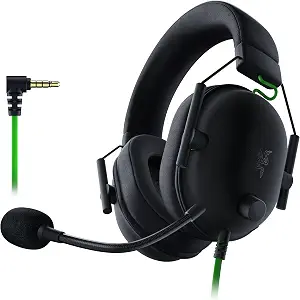
Razer BlackShark V2 X Gaming Headset
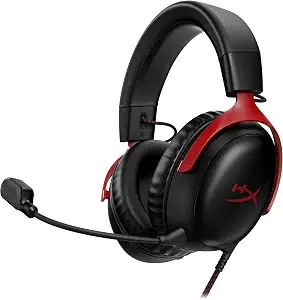
HyperX Cloud III Wired Gaming Headset for PC, PS5, PS4, Xbox Series X | S
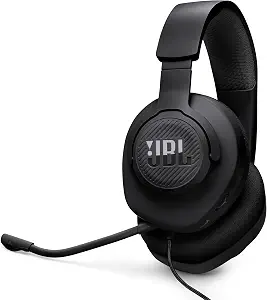
JBL Quantum 100M2 Wired Gaming Headset, Detachable Mic – Black
Best Gaming Headset Buying Guide — Black Friday Deals 2026
Which connection will your gaming headset actually use, and which details matter once it is on your head for a long session? Those questions make a more useful starting point than a headline deal. This guide compares three wired options through their connections, microphone arrangements, fit details, and listed specifications. The Razer BlackShark V2 X is the Best Overall pick among these products, the JBL Quantum 100M2 is Best Budget, and the HyperX Cloud III is Best for connection flexibility. These are editorial fit labels, not results from comparative testing. During Black Friday, use them to build a shortlist, then verify the exact product variant and offer before deciding.
Razer BlackShark V2 X Gaming Headset
The Razer BlackShark V2 X earns the Best Overall label among this group for shoppers whose setup suits a straightforward 3.5mm Audio Jack connection. Its listed compatibility includes PC, Mac, PS4, Xbox One, and Nintendo Switch through that jack, so it is worth considering if you want one wired headset to connect with more than one of those devices. Check the connection on the specific device you plan to use; for Xbox One, a stereo adapter may be required and is purchased separately. That qualification matters when comparing a Black Friday offer, because the headset listing alone does not establish whether you already have the additional adapter you might need.
The headset has custom-tuned 50 millimeters drivers and software-enabled 7.1 surround sound for positional audio, with an important limitation: that surround feature is available only on Windows 10 64-bit. Treat it as a useful deciding detail only if that platform condition matches your setup. It is not a reason to assume the same software feature applies to every listed compatible device. Memory Foam ear cushions are another concrete fit detail to weigh against your own preferences; comfort remains personal, so the material is a point to consider rather than a promise about how it will feel.
For a Black Friday shortlist, this pick makes sense when the 3.5mm connection and stated device compatibility align with your routine, and when you understand the Windows qualification for surround sound. Its Best Overall label means it is a broadly useful choice among these three based on the supplied features, not a claim of measured superiority. Compare the listing’s exact model and included configuration with what you need, especially if you plan to use Xbox One or are counting on software-enabled surround audio. If those checks line up, its combination of a familiar wired connection, stated compatibility, and memory foam cushions gives you a focused basis for choosing.
Key specs
| Connection | 3.5mm Audio Jack |
| Driver size | 50 millimeters |
| Surround sound | 7.1 SURROUND SOUND FOR POSITIONAL AUDIO — Outfitted with custom-tuned 50 mm drivers, capable of software-enabled surround sound. *Only available on Windows 10 64-bit |
| Compatibility | Works with PC, Mac, PS4, Xbox One, Nintendo Switch via 3.5mm jack |
| Xbox adapter | Xbox One stereo adapter may be required, purchase separately |
| Ear cushion material | Memory Foam |
HyperX Cloud III Wired Gaming Headset for PC, PS5, PS4, Xbox Series X | S
Check Price on Amazon
The HyperX Cloud III is the Best for connection flexibility choice here because its listed connectivity includes USB-C, USB-A, and 3.5mm. That range gives shoppers several connection types to check against the devices they intend to use, rather than requiring them to start with just one listed connector. The product name identifies PC, PS5, PS4, and Xbox Series X | S, while the supplied connection facts specify the three connector options. Before buying, match the connector and the exact product variant to your own device; do not assume every port or configuration is interchangeable just because multiple connection types are listed. That verification is particularly useful when Black Friday listings emphasize a deal before making the variant easy to spot.
Its detachable microphone is a practical detail for a buyer who wants the option to remove the mic when it is not needed. The headset also lists angled 53mm drivers, an aluminum frame, an audio impedance of 64 ohm, a frequency response of 21000 hertz, and a weight of 308 g. These are comparison points, not guarantees of a particular sound, comfort level, or device performance. Think about which details answer a real question for you: microphone removal, frame material, or stated weight may influence your shortlist more directly than a technical figure whose meaning you do not need to prioritize.
This is a strong fit to consider when connection options are central to your purchase and you can confirm which one suits your setup. The Best for connection flexibility label refers to its listed USB-C, USB-A, and 3.5mm connectivity; it does not establish that it is the best headset for every device or use. On Black Friday, inspect the exact listing details and make sure the item corresponds to the model and connection choices you intended to compare. Then weigh the detachable microphone and the stated construction and weight against your personal preferences. If your first priority is choosing among the listed connection types, this product deserves a place near the top of your shortlist.
Key specs
| Connectivity | USB-C + USB-A + 3.5mm Connectivity |
| Microphone | Detachable microphone |
| Driver size | Angled 53mm drivers |
| Frame material | Aluminum |
| Audio impedance | 64 ohm |
| Frequency response | 21000 hertz |
| Weight | 308 g |
JBL Quantum 100M2 Wired Gaming Headset, Detachable Mic – Black
Check Price on Amazon
The JBL Quantum 100M2 is the Best Budget option among these three, an editorial label intended to help organize this comparison rather than a claim about market-wide prices. Its listed connection is a 3.5 mm Jack, and it has a detachable microphone, memory foam ear cushions, and an over-ear fit. Those details make it a candidate for someone who wants a simple wired connection and prefers to have the option of removing the mic. Confirm that the jack works with the device you plan to connect; the available facts do not list compatibility, so check the exact product listing rather than relying on the label alone. That extra step is especially worthwhile when Black Friday pages place several variants side by side.
The listed driver size is 40 millimeters, the weight is 220 g, and the impedance is 32 ohm. Use these figures to distinguish the product on paper, not to predict exactly how it will sound or feel for you. The over-ear fit and memory foam cushions are useful personal checkpoints, but individual comfort can vary. Likewise, a detachable mic may suit a setup where you sometimes want the microphone off the headset, while a buyer who always uses voice chat may care more about how the mic fits their routine. Decide which of these supplied features has a real role in your day-to-day use before comparing offers.
For a Black Friday purchase, the JBL is worth a closer look if its 3.5 mm Jack matches your device and its microphone and cushion details suit your preferences. The Best Budget label is a relative editorial recommendation within this featured group; it does not promise a particular price or discount. Check the exact listing for the model and variant you mean to buy, and compare the offer on that item rather than judging by a headline. If the connection is right and you value an over-ear design, memory foam cushions, and a detachable mic, those stated details provide a grounded reason to consider it without needing to assume anything about unlisted features.
Key specs
| Microphone | Detachable Mic |
| Ear cushions | Memory Foam Ear Cushions |
| Connection | 3.5 mm Jack |
| Driver size | 40 millimeters |
| Weight | 220 g |
| Fit | Over Ear |
| Impedance | 32 ohm |
Stage one: make the connection a pass-or-pause test
Start by identifying the port or connection type you can use on the device that matters most. The Razer lists a 3.5mm Audio Jack, the JBL lists a 3.5 mm Jack, and the HyperX lists USB-C, USB-A, and 3.5mm connectivity. These are not identical descriptions of a connection setup, so compare the exact wording with the device you intend to connect. A broader list of connection types may be useful when you want options, but it does not remove the need to verify the appropriate connection for each device.
Next, look at the stated compatibility rather than extending it by assumption. The Razer record names PC, Mac, PS4, Xbox One, and Nintendo Switch through its 3.5mm jack, and notes that an Xbox One stereo adapter may be required and is purchased separately. The HyperX product name identifies PC, PS5, PS4, and Xbox Series X | S. The provided JBL facts do not specify compatibility, so use its listing to confirm that point. During Black Friday, this quick connection-and-device check can eliminate a tempting offer that does not fit your planned setup.
Stage two: choose the microphone setup you will use
The two products explicitly listed with detachable microphones are the HyperX Cloud III and JBL Quantum 100M2. Consider whether removing a microphone is useful in your routine, rather than treating detachability as an automatic advantage. For example, a shopper who wants the option to take the mic off can weigh that feature directly; someone who expects to use voice chat regularly may instead want to make microphone arrangement part of a broader fit decision. The Razer facts supplied here do not specify its microphone arrangement, so compare its exact listing if that detail is essential to you.
Keep this decision grounded in what is actually stated. A detachable microphone does not, by itself, establish voice quality or how convenient the microphone will feel during a particular activity. Use Black Friday comparisons to check that the model shown is the same one you shortlisted and that its stated microphone configuration matches your preference. If the microphone is a deciding feature, give that fact more weight than a general deal label. If it is secondary, settle the connection and fit questions first, then use microphone arrangement to break a close choice.
Stage three: treat fit and weight as personal checkpoints
The JBL is specified as over-ear and lists memory foam ear cushions; the Razer also lists memory foam ear cushions. Those details can help you decide which product to investigate, but they cannot settle comfort for every wearer. Think about what you personally prefer in an ear cushion and fit, and avoid reading a material description as a guarantee about long-session comfort. The HyperX facts supplied here specify an aluminum frame and a weight of 308 g, while the JBL lists a weight of 220 g. These are separate product details, not a direct prediction of which headset will feel better to you.
Use the stated construction and weight as supporting clues after confirming that the product meets your basic connection needs. The HyperX’s aluminum frame may be relevant if frame material is one of your selection criteria, while the listed weights give you a factual point of comparison. No single figure answers every comfort question. Black Friday can make it easy to focus on the offer first; instead, pause to ask whether a fit or construction detail actually matters in your own use. If you cannot tell from the supplied specification, treat it as something to verify on the exact listing, not a reason to invent a conclusion.
Stage four: interpret audio specifications with restraint
Driver size is one point of comparison across these options: the Razer lists 50 millimeters, the HyperX lists angled 53mm drivers, and the JBL lists 40 millimeters. The numbers and descriptions can distinguish the products on a specification sheet, but they do not establish which one will sound best to an individual listener. Keep the figures in context and avoid turning them into promises about immersion, clarity, or positional accuracy. Instead, use them if comparing stated hardware is important to you, then make the final decision through features tied more directly to your setup and preferences.
The Razer also lists software-enabled 7.1 surround sound for positional audio, qualified as available only on Windows 10 64-bit. That condition should stay attached to the feature whenever you consider it. The HyperX lists an audio impedance of 64 ohm and frequency response of 21000 hertz; the JBL lists an impedance of 32 ohm. These are useful facts to have, but they do not independently settle compatibility or listening results. While browsing Black Friday offers, compare the exact features and their qualifications, not an interpretation that the specifications do not support.
Stage five: verify the Black Friday listing before choosing
Once your shortlist reflects connection, microphone, and fit priorities, inspect the exact listing and variant you are considering. Confirm the product name and the connection information shown for that item; a category headline alone is not enough to establish that it matches your intended choice. For the Razer, remember the stated Xbox One adapter qualification and the Windows 10 64-bit limit on software-enabled surround sound. For the HyperX, check which listed connection type suits your device. For the JBL, confirm compatibility with your device because it is not specified in the facts here.
Then compare the offer itself with your shortlist rather than assuming that a Black Friday banner means a particular saving or configuration. Check that the item displayed is the model you meant to evaluate and that the listing supports the features you are relying on. No price, discount, or stock claim is needed to make this a useful step: the key is matching the exact offer to the exact product and your setup. If a crucial detail is unclear, verify it before purchase or keep another shortlisted headset in consideration.
Make your Black Friday choice
A sound shortlist begins with the device connection you can use, then narrows through microphone preferences, fit, and the specifications that matter to you. Among these products, the Razer is the Best Overall choice in this comparison, the JBL is Best Budget, and the HyperX is Best for connection flexibility, each label reflecting stated features rather than a test result. Before choosing a Black Friday offer, revisit the exact listing, confirm the variant and connection, and check any relevant qualifications—especially the Razer’s adapter and software limits. That final checklist is more dependable than a deal headline alone.